Themes
A theme controls your website’s overall style — header design, footer style, default colors, fonts, and layout feel. uLanding ships with 10 professional themes. You can switch between them at any time.
Note Switching a theme changes the style of your site. Your content (pages, services, blog posts) stays in place. Only one theme is active at a time.
Light vs Dark is a theme mode (Customizer → General), not a separate theme product. Each theme ships with a recommended default mode and demo content that looks best in that mode.
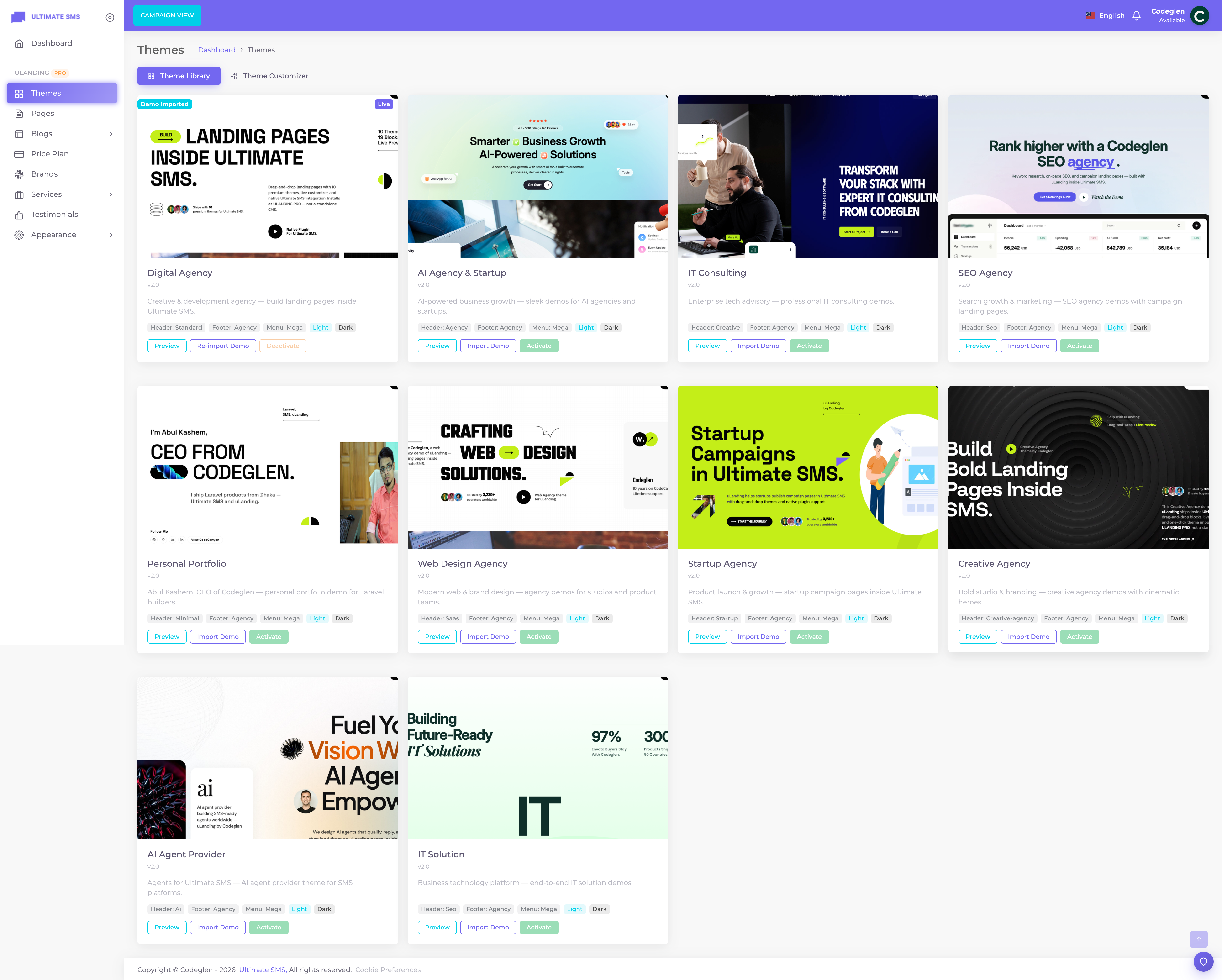
Screenshot: Themes library — preview, activate, and import demo on each theme card
Note After you enable uLanding under Plugins → All Plugins, the Themes item appears in the ULANDING PRO sidebar group.
The Theme Library
Go to Themes in the ULANDING PRO sidebar. Each theme card shows:
- A preview image
- A short description
- Preview — opens a live demo in a new tab (does not change your live site)
- Activate / Deactivate
- Import Demo — fills your site with that theme’s example content, menus, widgets, and settings
The active theme shows Active / Live badges.
Theme Library & automatic configuration
When you activate a theme (or import its demo), uLanding applies that theme’s recommended:
| Area | What is configured |
|---|---|
| Header | Header type, sticky behavior, CTA defaults |
| Footer | Footer type and footer CTA defaults |
| Menus | Menu style (standard / mega / off-canvas) |
| Theme mode | Light or Dark default |
| Colors & fonts | Starter palette and typography |
| Homepage | Set automatically when you Import Demo |
Import Demo goes further and also creates pages, widgets, blogs, brands, services, images, and Customizer profiles. See Demo Importer.
Available themes
Each theme below lists its purpose, best use case, available layouts / demo HTML references, default mode, and how to import.
1. Digital Agency (default)
| Purpose | A flexible agency marketing site |
| Best for | Digital agencies, marketing teams, general businesses |
| Default mode | Dark |
| Demo layouts | Light feel optional via Customizer; seeded demo uses dark |
| Source demo HTML | index.html (dark companion: index-dark.html) |
| Header / Footer | Standard / agency-style header; agency footer |
| Demo import | Themes → Digital Agency → Import Demo |
2. AI Agency & Startup
| Purpose | Futuristic AI / automation brand presence |
| Best for | AI companies, ML startups, automation consultancies |
| Default mode | Dark |
| Source demo HTML | index-ai-agency.html |
| Header / Footer | Agency header with strong CTA; agency footer |
| Demo import | Themes → AI Agency & Startup → Import Demo |
3. IT Consulting
| Purpose | Professional consulting and enterprise IT |
| Best for | IT consultancies, system integrators |
| Default mode | Light |
| Layouts | Light and Dark site modes supported |
| Source demo HTML | index-it-consulting-light.html / index-it-consulting-dark.html |
| Demo import | Themes → IT Consulting → Import Demo |
4. SEO Agency
| Purpose | Growth-focused SEO and performance marketing |
| Best for | SEO agencies, content / growth teams |
| Default mode | Light |
| Layouts | Light and Dark site modes supported |
| Source demo HTML | index-seo-agency-light.html / index-seo-agency-dark.html |
| Special | Interactive tilt effects on some sections |
| Demo import | Themes → SEO Agency → Import Demo |
5. Personal Portfolio
| Purpose | Personal brand and freelance portfolio |
| Best for | Designers, developers, freelancers |
| Default mode | Light |
| Layouts | Light and Dark site modes supported |
| Source demo HTML | index-personal-portfolio-light.html / index-personal-portfolio-dark.html |
| Header | Minimal; menu often in off-canvas |
| Demo import | Themes → Personal Portfolio → Import Demo |
6. Web Design Agency
| Purpose | Creative web studio marketing site |
| Best for | Web design agencies and product studios |
| Default mode | Light |
| Layouts | Light and Dark site modes supported |
| Source demo HTML | index-web-design-agency-light.html / index-web-design-agency-dark.html |
| Demo import | Themes → Web Design Agency → Import Demo |
7. Startup Agency
| Purpose | Early-stage startup and growth brand |
| Best for | Startups and scale-ups |
| Default mode | Light |
| Layouts | Light and Dark site modes supported |
| Source demo HTML | index-startup-agency-light.html / index-startup-agency-dark.html |
| Demo import | Themes → Startup Agency → Import Demo |
8. Creative Agency
| Purpose | Bold creative and branding studio |
| Best for | Brand studios, creative agencies |
| Default mode | Light |
| Layouts | Light and Dark site modes supported |
| Source demo HTML | index-creative-agency-light.html / index-creative-agency-dark.html |
| Demo import | Themes → Creative Agency → Import Demo |
9. AI Startup
| Purpose | Modern AI product launch site |
| Best for | AI SaaS and product startups |
| Default mode | Dark |
| Layouts | Light and Dark site modes supported |
| Source demo HTML | index-ai-startup-light.html / index-ai-startup-dark.html |
| Demo import | Themes → AI Startup → Import Demo |
10. IT Solution
| Purpose | IT services and solution provider |
| Best for | Managed IT, infrastructure, and solution firms |
| Default mode | Light |
| Source demo HTML | index-it-solution-light.html |
| Demo import | Themes → IT Solution → Import Demo |
Note The HTML filenames above refer to the original design demos used to build each theme’s content. Inside Ultimate SMS you work entirely in the admin — you do not upload these HTML files yourself.
Choosing the right theme
| Your business | Recommended theme |
|---|---|
| General agency / marketing | Digital Agency |
| AI / machine learning company | AI Agency & Startup or AI Startup |
| IT consulting / enterprise IT | IT Consulting or IT Solution |
| SEO / digital marketing | SEO Agency |
| Freelancer / personal brand | Personal Portfolio |
| Web design studio | Web Design Agency |
| Early-stage startup | Startup Agency |
| Design / branding studio | Creative Agency |
Tip Themes set defaults only. After activation, change colors, fonts, header, and footer in the Theme Customizer.
Activating a theme
- Go to Themes.
- Click Activate on the theme you want.
- The theme becomes active immediately.
Behind the scenes:
- The previous theme is deactivated (only one active theme).
- Header / footer / menu defaults are applied.
- Theme caches are cleared.
Warning Activating a theme does not import demo content. Use Import Demo for pages, images, menus, and widgets (Demo Importer).
Previewing a theme
Click Preview on any theme card to open a full-screen demo. Preview does not change your live site. Many themes also have public demos at https://ulanding.codeglen.com/themes/<theme-slug>.
Light Theme & Dark Theme
| Level | Where | Values |
|---|---|---|
| Site mode | Customizer → General → Theme mode | Light or Dark |
| Section mode | Page Builder section settings | Inherit, Light, or Dark |
- Inherit — the section follows the global site mode.
- Light / Dark — forces that section’s backgrounds and text, useful for alternating bands.
See also Theme Customizer and Page Builder.
Deactivating a theme
Deactivate turns off the active theme without selecting another. Prefer activating a different theme instead. The renderer falls back to the first available theme if none is active.
Theme configuration defaults
Each theme pre-configures:
- Container / site width
- Header type
- Footer type
- Menu behavior
- Default color mode
- Off-canvas layout where applicable
Continue to Demo Importer.