Installation
This chapter walks you through installing, verifying, and activating uLanding inside Ultimate SMS. Customers install the plugin the same way as other Ultimate SMS plugins: upload a ZIP with your Envato purchase code.
Note uLanding is a plugin for Ultimate SMS (minimum version 3.6.0). Ultimate SMS must already be installed and licensed before you continue.
What you need before you start
| Item | Details |
|---|---|
| Ultimate SMS | Version 3.6.0 or higher, fully installed |
| Admin access | An administrator account that can manage Plugins |
| Purchase code | Your Envato / CodeCanyon purchase code for uLanding |
| Plugin ZIP | The ulanding plugin package downloaded from your purchases |
| Server write access | PHP must be able to write under packages/ and run Composer |
Tip If you lost your purchase code, open Where Is My Purchase Code? on Envato Help Center.
Part 1 — Download the plugin
- Log in to your Envato / CodeCanyon account.
- Open Downloads (or your purchase history).
- Download the uLanding plugin package (ZIP).
- Keep the ZIP as-is — do not rename files inside it before upload.
Warning Upload the official plugin ZIP only. Do not upload a nested archive, a partial folder, or a renamed
composer.json. Invalid packages fail verification.
Part 2 — Upload the plugin ZIP
- Log in to your Ultimate SMS admin panel.
- Go to Plugins → Add Plugin.
- Read the short instructions on the page.
- Enter your Purchase code.
- Click Choose File and select the uLanding ZIP from your computer.
- Click Upload.
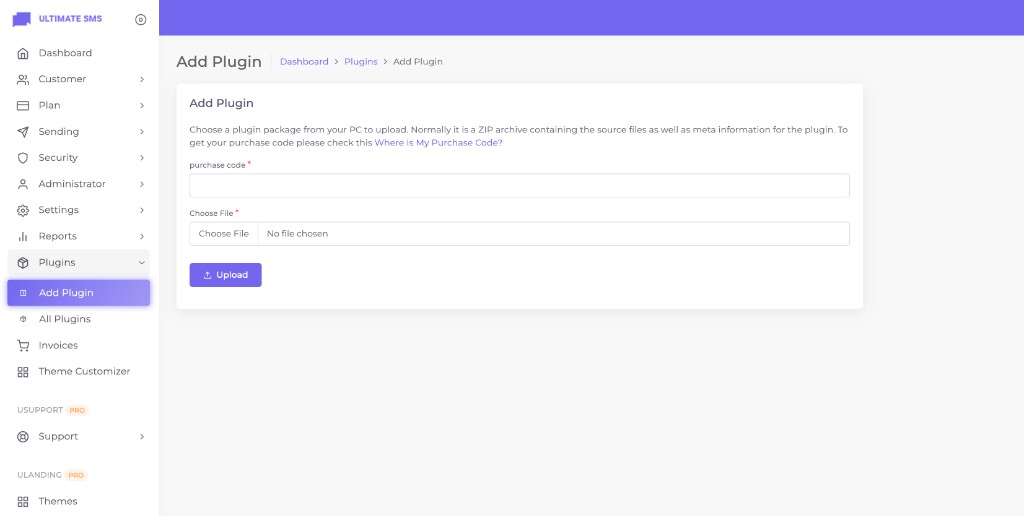
Screenshot: Plugins → Add Plugin — purchase code and file upload
What happens during upload
Ultimate SMS automatically:
- Verifies your purchase code against your site domain.
- Confirms the package is compatible with your Ultimate SMS version (
app_version≥ 3.6.0). - Extracts the plugin into
packages/codeglen/ulanding/. - Registers the package with Composer.
- Publishes plugin assets / configuration.
- Runs plugin database migrations.
- Saves the purchase code on the plugin record.
You normally do not need to run Artisan commands yourself when the upload succeeds.
Note After a successful upload, the plugin is usually created as inactive. Continue to Activate the plugin.
Part 3 — Activate the plugin
- Go to Plugins → All Plugins.
- Find uLanding - Landing Page Plugin for Ultimate SMS.
- Confirm the status badge and version (for example v.1.0.0).
- Click Enable (or ensure the plugin shows Active).
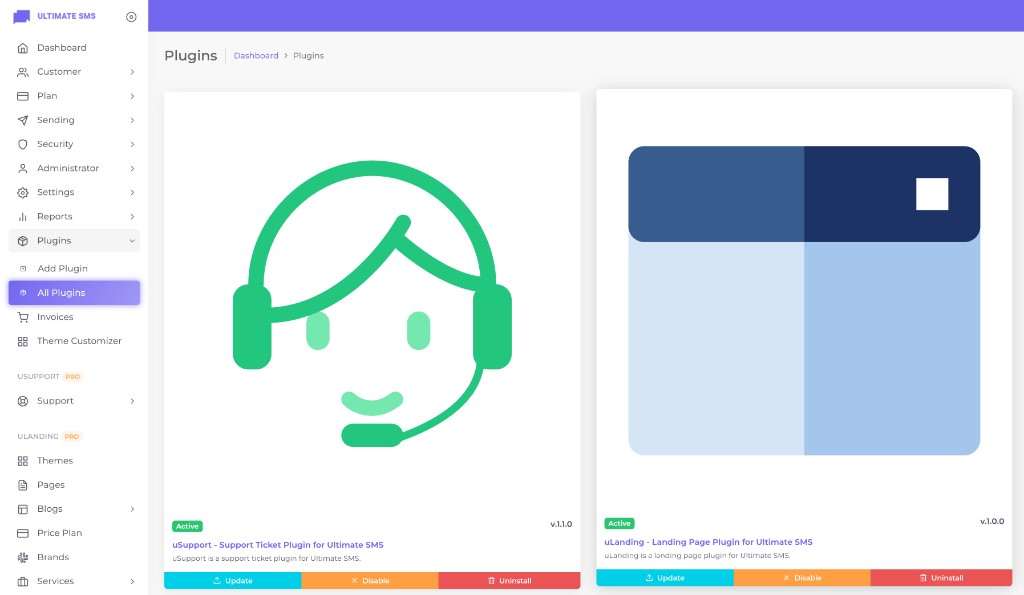
Screenshot: Plugins → All Plugins — uLanding listed as Active
Verify the admin menus
When uLanding is active, the sidebar gains an ULANDING PRO group with links such as:
- Themes
- Pages
- Blogs
- Price Plan
- Brands
- Services
If you do not see these menus, refresh the page, clear caches, and confirm your admin role has plugin permissions.
Part 4 — Purchase code verification
The purchase code is checked when you upload the plugin:
| Check | Result |
|---|---|
| Code format | Required; typically 15+ characters |
| Domain match | Verified against your Ultimate SMS site URL |
| Envato validity | Confirmed with the license service |
| Version compatibility | Plugin app_version must be ≤ your Ultimate SMS version |
Warning Each purchase code is licensed for the domain where Ultimate SMS is installed. Installing the same code on an unauthorized domain can fail verification.
Common purchase-code errors
| Message / symptom | What to do |
|---|---|
| Invalid purchase code | Re-copy the code from Envato; avoid trailing spaces |
| Domain mismatch | Install on the licensed domain, or update license/domain binding per Envato rules |
| Ultimate SMS too old | Upgrade Ultimate SMS to 3.6.0+ |
| Upload rejected | Use the original ZIP; ensure ZIP upload is allowed by PHP |
Part 5 — Verify installation
You are successfully installed when all of the following are true:
- ✅ Plugins → All Plugins shows uLanding as Active.
- ✅ The sidebar shows the ULANDING PRO menu group.
- ✅ Themes opens and lists all 10 themes.
- ✅ You can open the Theme Customizer.
- ✅ Visiting your public site loads uLanding pages (after you activate a theme / import a demo).
Tip Next step for most users: open Themes, pick a theme, and click Import Demo. See Demo Importer.
Optional — Manual / developer install
Use this only if the admin uploader cannot run Composer or migrations on your server (rare on normal Ultimate SMS hosting).
- Extract the package to
packages/codeglen/ulanding/. - From the Ultimate SMS project root:
composer require codeglen/ulanding
php artisan vendor:publish --tag=plugin --force
php artisan migrate
php artisan storage:link
php artisan optimize:clear
- Enable the plugin from Plugins → All Plugins.
Note Everyday CodeCanyon customers should use Plugins → Add Plugin. Manual install is for developers and rescue situations only.
Permissions
uLanding uses Ultimate SMS roles and permissions. Super admins already see everything. Typical permissions:
| Feature | Permission(s) |
|---|---|
| Themes & Customizer | view themes, manage themes |
| Pages | view pages, create page, update page, delete page |
| Blogs | view blogs, view blog_categories, view blog_tags, view blog_comments, manage blog_settings |
| Services | view services, view service categories |
| Price Plans | view price_plan, create price_plan, update price_plan, delete price_plan |
| Brands | view brands, create brand, update brand, delete brand |
| Testimonials | view testimonials, create testimonial, update testimonial, delete testimonial |
| Widget Builder | manage widget_builder |
| Menus | view menu, create menu, update menu, delete menu |
| 404 Settings | manage 404_settings |
Directory structure after install
your-project/
├── config/ulanding.php              ← published configuration
├── packages/codeglen/ulanding/      ← the plugin package
├── storage/app/public/              ← uploaded images
└── storage/ulanding-demo/           ← demo images (after demo import)
For a deeper overview, see Plugin Architecture.
Installation troubleshooting
| Problem | Likely cause | Fix |
|---|---|---|
| Upload fails immediately | Invalid ZIP or PHP upload limit | Use the official ZIP; raise upload_max_filesize / post_max_size |
| Purchase code rejected | Wrong code or domain | Re-check Envato code and licensed domain |
| Plugin installs but menus missing | Plugin disabled | Enable uLanding under All Plugins |
| Themes list empty | Seed / install incomplete | Re-run plugin install / migrations; contact support if empty after a clean install |
| Images broken | Storage not linked | Run php artisan storage:link; ensure storage is writable |
| Changes not visible | Caches | Clear Ultimate SMS / application cache (php artisan optimize:clear if you have SSH) |
More fixes: Troubleshooting.
Continue to Configuration or Updating uLanding.